The hard part of agentic AP is not getting a model to write a plausible answer. The hard part is letting an agent do useful work without turning your finance operation into a pile of guesses.
An AP agent needs to know which invoice is real, which vendor record is authoritative, which approval policy applies, which bank transaction settled, which GL category was suggested, and which action is allowed without a human sign-off. It also needs to remember what it did yesterday.
That is why we built Harness.
Harness is the Cadense control plane for agent-run AP operations. It gives agents a workspace with durable resources, scoped tools, approvals, files, tables, knowledge bases, inbox tasks, schedules, logs, and evidence. The model can reason, but the platform owns the boundaries.
Harness is built on Cadense's own workflow execution foundation. We kept the canvas, block execution model, connector surface, logs, tables, files, scheduling primitives, and execution traces, then specialized the runtime for AP controls: invoices, vendors, approvals, bank data, reconciliation, categorization, accounting handoff, and audit evidence.
TL;DR
- Harness is a governed agent runtime for AP work: invoice intake, vendor follow-up, approvals, reconciliation, categorization, payment support, accounting handoff, and exception review.
- Harness builds on Cadense's workflow execution foundation, then adds AP-specific data models, controls, evidence, and operating loops.
- Every task runs through a lifecycle: intake, scope, context, plan, risk check, tool execution, evidence capture, completion, and audit.
- Workspace resources are first-class: Tables hold structured state, Files hold artifacts and source documents, Knowledge Bases ground retrieval, workflows execute repeatable processes, and integrations perform real actions.
- Tool execution is split by risk. Reads can run freely inside scope. Writes can require confirmation. Payment, vendor, bank, and accounting actions are held behind stricter gates.
- Harness can run from chat, email, scheduled tasks, workflow blocks, and eventually API surfaces. The same policy and audit model applies to every entry point.
The control plane
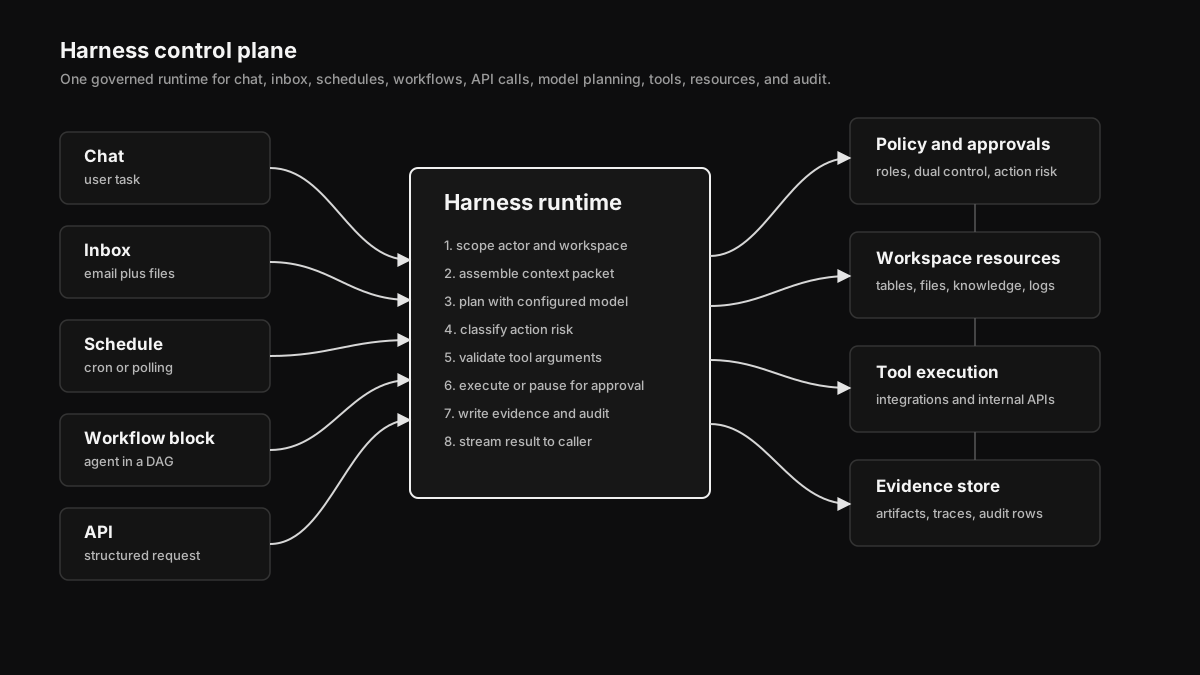 Harness sits between user intent, workspace resources, model providers, policy gates, and execution surfaces. It is the layer that turns "handle this AP exception" into scoped reads, approved writes, evidence, and a traceable outcome.
Most agent demos skip the part that matters in finance: who is allowed to do what, using which data, with what evidence.
Harness treats an agent task as a structured operation, not a chat message. A task has:
| Field | Why it matters |
|---|---|
actor | User, schedule, inbox sender, workflow, or API client that initiated the run |
workspace_id | Hard boundary for data, credentials, policies, and audit |
intent | The natural-language request or structured task payload |
scope | The allowed resources, entities, date ranges, and tools |
context | Retrieved invoices, vendors, bank transactions, files, policies, and prior runs |
plan | Candidate actions before tool execution |
risk_profile | Read, low-risk write, sensitive write, finance-critical action |
approvals | Human or policy gates required before execution |
evidence | Files, rows, references, tool results, and reasoning snapshots |
result | The user-facing outcome plus machine-readable status |
This structure sounds bureaucratic until you compare it with the alternative: a model with a long prompt and a bunch of credentials. That might work for a demo. It is not how you let software touch vendor records, bank feeds, and accounting systems.
A task is a state machine
Harness runs tasks through an explicit state machine.
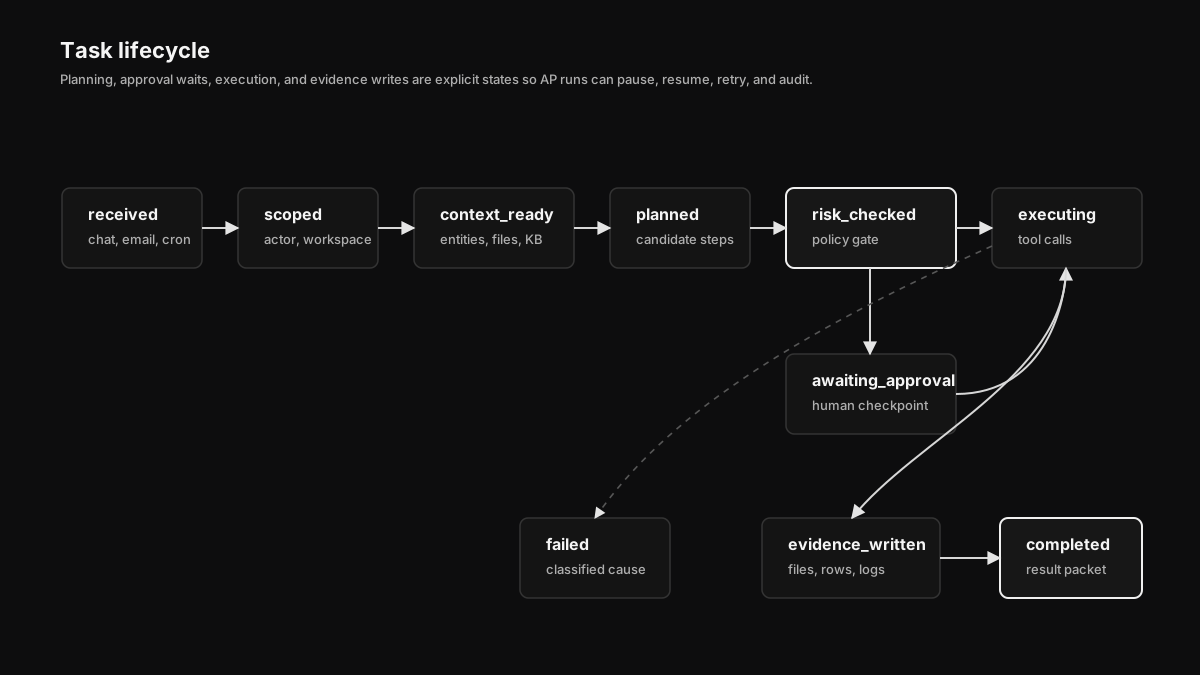 A Harness task starts as intent, then becomes a scoped run with context, a plan, risk checks, tool calls, evidence, and a final outcome. Errors and approval waits are states, not side effects.
The main states:
| State | Meaning |
|---|---|
received | The request arrived from chat, email, schedule, workflow, or API |
scoped | Workspace, actor, permissions, and allowed resources are resolved |
context_ready | Relevant tables, files, knowledge chunks, entities, and prior runs are attached |
planned | The model or deterministic planner proposes steps |
awaiting_approval | A policy gate requires a human or admin approval |
executing | Tool calls are running with idempotency and credential scopes |
evidence_written | Files, rows, logs, and references are persisted |
completed | The task produced an accepted result |
failed | The task failed with a classified reason and retry posture |
The important detail is that planned and executing are separate. A model can propose "update the vendor bank account" or "mark this invoice as reconciled," but the action does not run until the policy layer says it can. For AP, that distinction is the product.
Context assembly
Good AP work is context-heavy. A human reviewer rarely makes a decision from one screen. They look at the invoice PDF, the vendor master, prior payments, bank descriptors, approval history, remittance notes, W-9s, accounting mappings, and sometimes a policy doc.
Harness does the same assembly before it asks a model to reason.
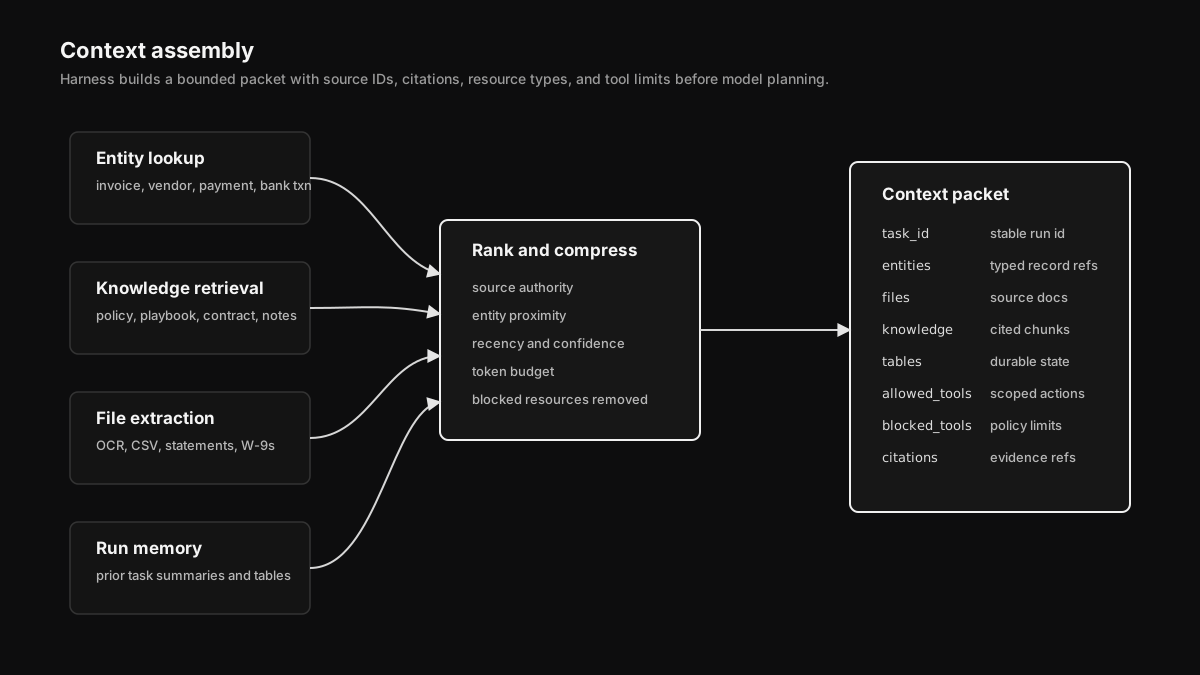 Context is assembled from deterministic entity lookups, vector retrieval, recent run memory, and user-provided files. The result is a bounded packet with citations and source types, not an unbounded prompt dump.
The context builder uses four paths:
- Entity lookup. Exact database reads for invoices, vendors, payments, approvals, bank transactions, GL categories, and reconciliation records.
- Knowledge retrieval. Hybrid search over synced docs, policies, playbooks, contracts, and prior AP notes.
- File extraction. OCR and parsers for PDFs, CSVs, spreadsheets, W-9s, remittance files, and statements.
- Run memory. Prior task summaries and durable table rows, filtered by workspace and resource scope.
Then it compresses. Harness does not throw every possible token into the model. It ranks by entity proximity, source authority, recency, and task fit. A vendor policy document beats an old Slack message. A bank transaction linked to the invoice beats a random transaction with a similar amount. A controller-approved rule beats an inferred pattern.
The output is a context packet:
{"task_id": "task_01HX...",
"workspace_id": "ws_01HY...",
"actor": { "type": "user", "id": "usr_123" },
"intent": "Reconcile the Stripe payout for Northline Logistics",
"entities": {
"invoices": ["inv_1842"],
"payments": ["pay_7841"],
"bank_transactions": ["txn_9982"],
"vendors": ["ven_2201"]
},
"retrieval": {
"knowledge_chunks": ["kb_chunk_8", "kb_chunk_19"],
"files": ["file_w9", "file_remittance"],
"tables": ["vendor_aliases", "reconciliation_rules"]
},
"limits": {
"allowed_tools": ["banking.search_transactions", "reconciliation.create_suggestion"],
"blocked_tools": ["payments.initiate", "vendor.update_bank_account"]
}}This is the difference between an agent that sounds informed and an agent that is grounded.
The resource model
Harness is built around durable workspace resources.
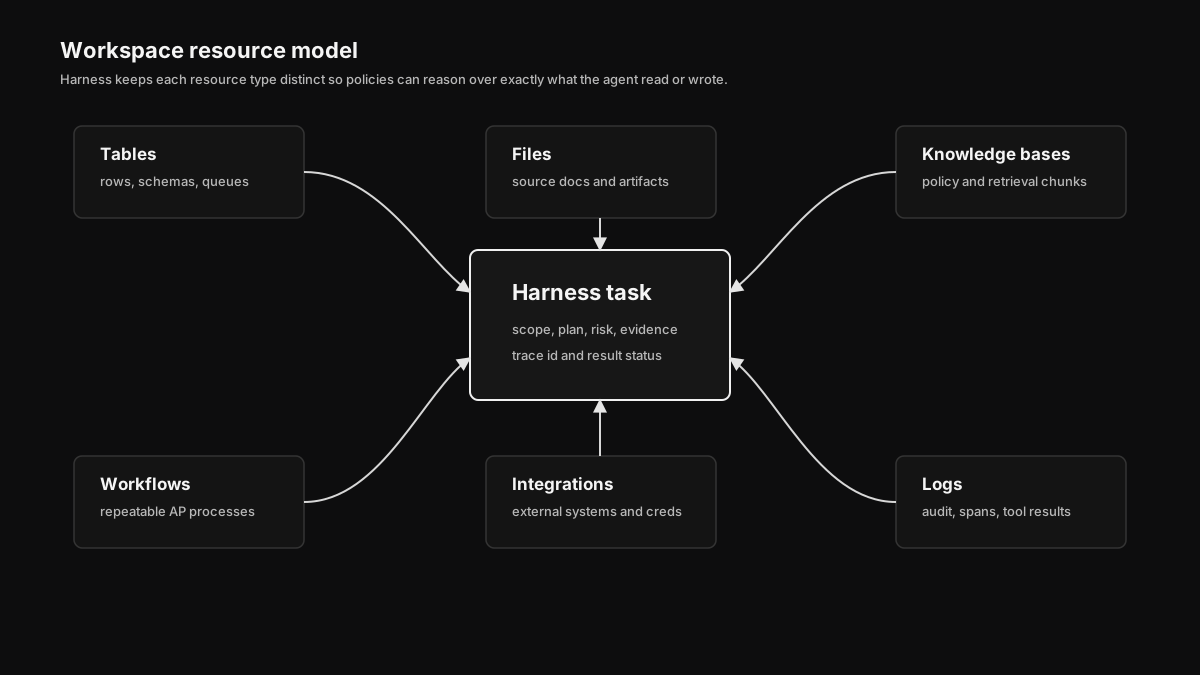 Tables, Files, Knowledge Bases, Workflows, Integrations, and Logs are separate resources with different access patterns. Harness reads across them, writes to them through scoped tools, and links evidence back to the task.
The five resource types matter because they fail differently.
| Resource | Used for | Failure mode we design around |
|---|---|---|
| Tables | Structured operational state: queues, staging rows, run memory, imported CSVs | Bad schema, duplicate rows, stale values |
| Files | Source documents and generated artifacts: invoices, W-9s, exports, reports | Parser failure, missing evidence, wrong version |
| Knowledge Bases | Policies, playbooks, contracts, vendor docs, team notes | Retrieval drift, stale sync, weak citation |
| Workflows | Repeatable AP procedures with block-level execution | Partial execution, retries, human pause |
| Integrations | Real external systems: banks, Slack, email, accounting, CRM, storage | Credential failure, rate limit, side-effect risk |
Harness does not flatten these into one generic "memory." A file is not a table. A knowledge chunk is not an invoice. A workflow run is not a chat transcript. Keeping the types separate gives the policy layer something concrete to reason over.
Core records
The control plane also needs a clear data model. The exact table names can evolve, but the shape is stable: tasks, resources, evidence, approvals, tool calls, and events are separate records.
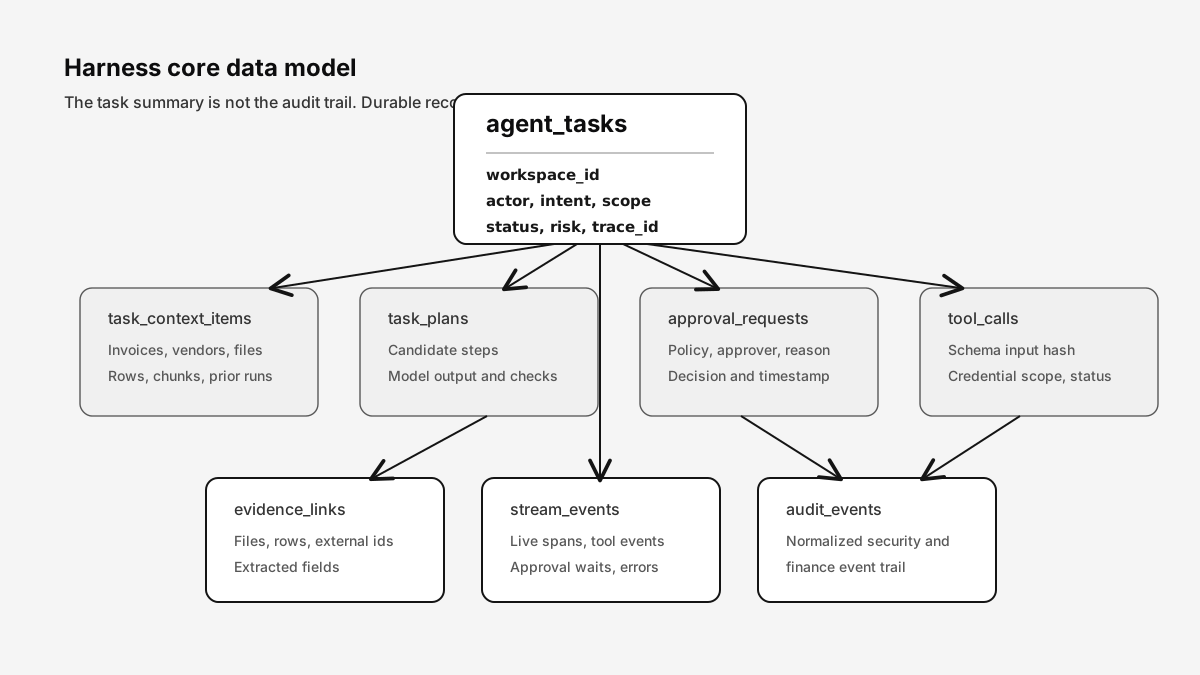 Harness keeps user intent, resources, approvals, tool calls, evidence, stream events, and audit records separate. That makes it possible to answer who acted, what was read, what changed, and which policy allowed it.
The minimum durable records:
| Record | Contains | Retention reason |
|---|---|---|
agent_tasks | Actor, workspace, intent, scope, status, risk, trace id | Reconstruct the task lifecycle |
task_context_items | Linked invoices, vendors, files, rows, chunks, prior runs | Prove what the agent used |
task_plans | Proposed steps, model output, deterministic checks | Separate planning from execution |
tool_calls | Tool name, input hash, credential scope, status, idempotency key | Audit every read and write |
approval_requests | Approver role, policy, decision, reason, timestamp | Support human control and dual approval |
evidence_links | Files, table rows, external IDs, extracted fields | Keep source material attached |
stream_events | Live run events and spans | Render progress and debug latency |
audit_events | Normalized security and finance events | Long-term compliance trail |
The practical point is simple: a task summary is not enough. A finance team needs the raw evidence, the normalized events, and the approval trail.
Tool execution and guardrails
The riskiest part of an agent is the moment it takes action.
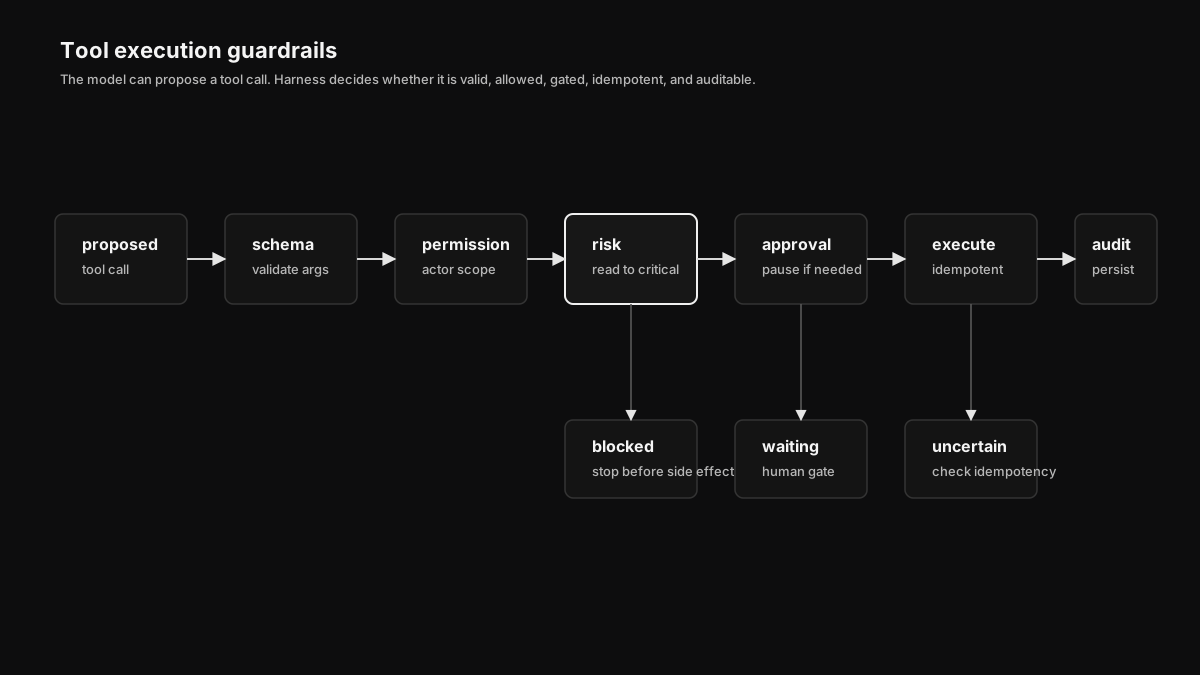 Tool calls pass through schema validation, permission checks, risk classification, approval gates, idempotency, execution, result normalization, and audit persistence.
Harness tools are not loose functions. Each tool has a contract:
| Contract field | Example |
|---|---|
name | reconciliation.create_suggestion |
input_schema | Zod/JSON schema for arguments |
credential_scope | Workspace OAuth account, hosted key, or internal service token |
risk_level | read, low_write, sensitive_write, finance_critical |
idempotency_key | Stable key for retries and external side effects |
approval_policy | Required approver roles and bypass rules |
result_schema | Normalized output shape written to logs |
That lets Harness split work into risk classes.
| Risk | Examples | Default posture |
|---|---|---|
| Read | Search invoices, fetch vendor, list bank transactions, query table | Allowed inside workspace scope |
| Low-risk write | Add note, create draft row, generate file, create reconciliation suggestion | Allowed or reviewable depending on workspace policy |
| Sensitive write | Update vendor, change category, edit workflow, sync accounting draft | Requires policy gate or explicit confirmation |
| Finance-critical | Initiate payment, approve payment, change bank account, post final journal entry | Strict approval, idempotency, audit, and often dual control |
This means "perform AP operations on behalf of the customer" is not a single permission. It is a matrix of scopes, resources, actions, and gates.
Permissions and approvals
Harness uses permissions at three layers: actor permissions, workspace policy, and tool-level risk rules.
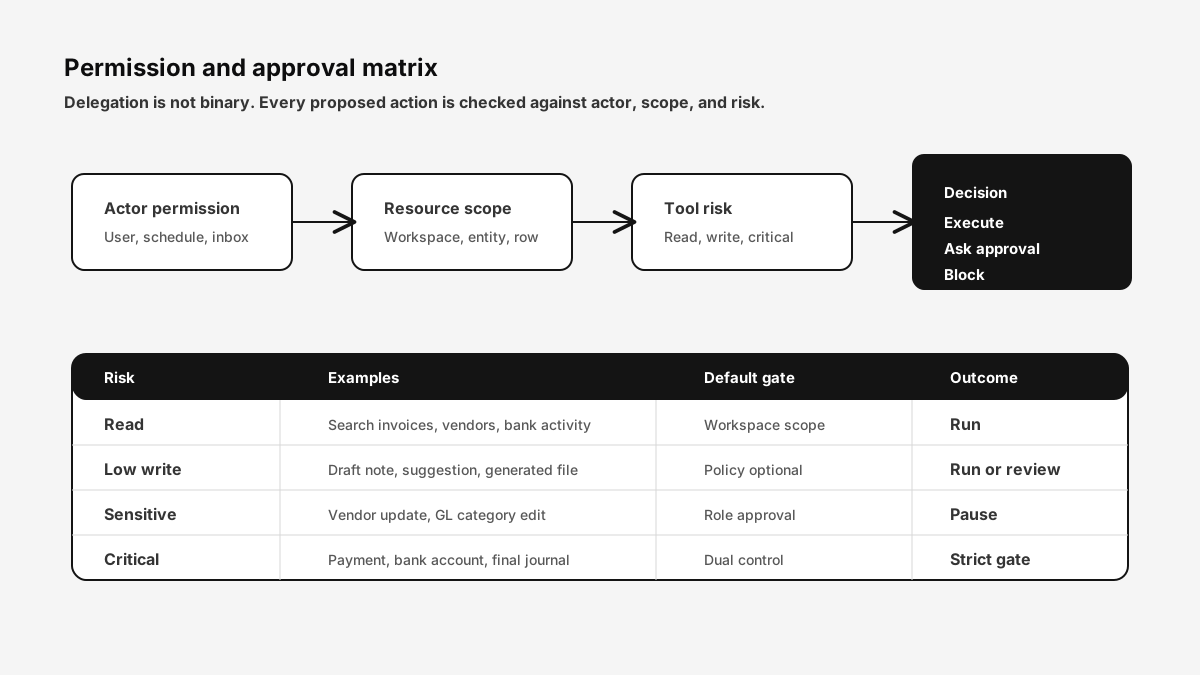 Actor permissions decide who can ask. Resource scopes decide what data can be used. Tool risk decides whether an action can run, needs approval, or must be blocked.
The policy engine should be able to answer these questions before every action:
| Question | Example |
|---|---|
| Who initiated this? | User, schedule, inbox sender, workflow, API client |
| Which workspace owns it? | Workspace-level isolation for data and credentials |
| Which resource is being touched? | Invoice, vendor, payment, bank transaction, GL mapping |
| Which action is proposed? | Read, draft, update, approve, sync, initiate |
| What is the risk? | Informational, operational, sensitive, finance-critical |
| What approval is required? | None, owner approval, controller approval, dual control |
| Can it be replayed safely? | Idempotency key present, external state checked |
This is how customer-delegated operation becomes safe. The customer can allow the agent to work, but the permission model decides how far it can go without a human.
AP operations loop
Harness is not only for building workflows. It is meant to operate AP work.
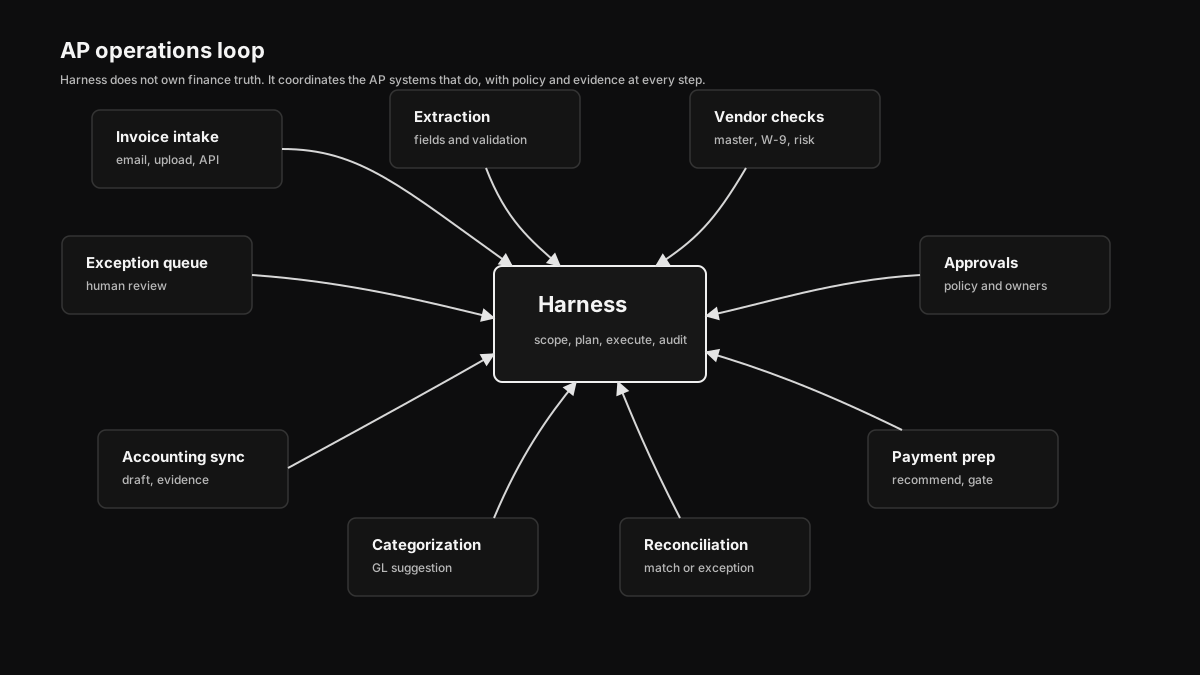 Harness can move through the AP loop: capture documents, extract fields, route approvals, prepare payments, reconcile bank activity, categorize spend, sync accounting drafts, and open exceptions.
A typical AP task looks like this:
- A vendor emails an invoice to the workspace inbox.
- Harness verifies the sender, stores attachments, extracts invoice fields, and links or creates the vendor.
- It checks duplicate risk against prior invoices, remittance files, and payment history.
- It routes the invoice through the approval workflow.
- After approval, it prepares a payment recommendation but does not initiate funds movement unless the workspace policy allows it.
- When bank activity lands, it calls the reconciliation engine and creates a match, suggestion, or exception.
- It calls the categorization engine for GL coding and holds low-confidence items for review.
- It prepares accounting sync payloads with evidence links.
- It writes a run summary, creates follow-up tasks, and notifies the right channel.
The user sees "handle this invoice." The system sees a chain of typed operations, each with policy and evidence.
Inbox and scheduled work
Agents become useful when they can run without a person opening the app.
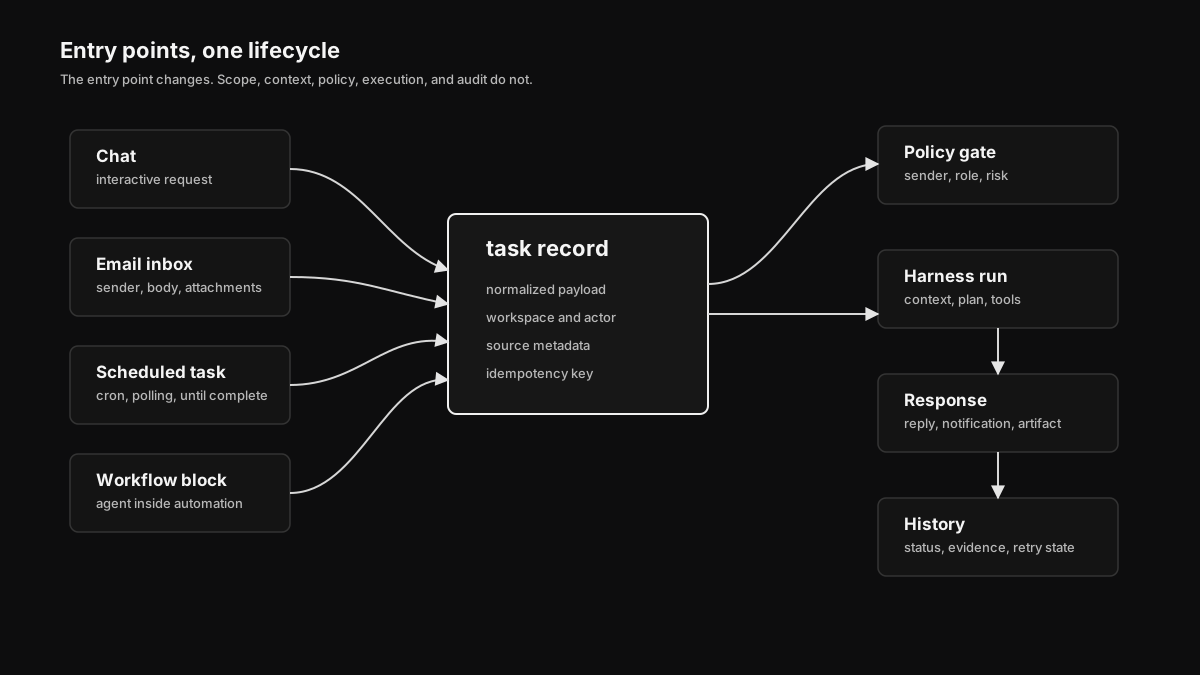 Harness can start from chat, email, scheduled jobs, workflow blocks, and API calls. The entry point changes, but the task lifecycle and policy gates stay the same.
The inbox path is built for unstructured work. A vendor, employee, or controller can email the workspace. Harness creates an inbox task, stores the raw message and attachments, validates the sender, formats the task into a chat run, executes scoped tools, and sends a reply or internal notification.
Scheduled tasks are built for recurring work:
| Mode | Example |
|---|---|
persistent | Every weekday at 8:30 AM, review new invoices and open approval tasks |
until_complete | Poll for a remittance file until it arrives, then reconcile the batch |
monitoring | Check stale pending payments and notify finance when thresholds are crossed |
close_support | Every month-end, summarize unreconciled items by entity and owner |
The same task can be started from chat, email, cron, or a workflow block. We do not want four different agent systems. We want one lifecycle with multiple doors.
API surface
Harness should be usable from the app, from workflows, and from external systems. That means the APIs need to be explicit instead of hidden behind the UI.
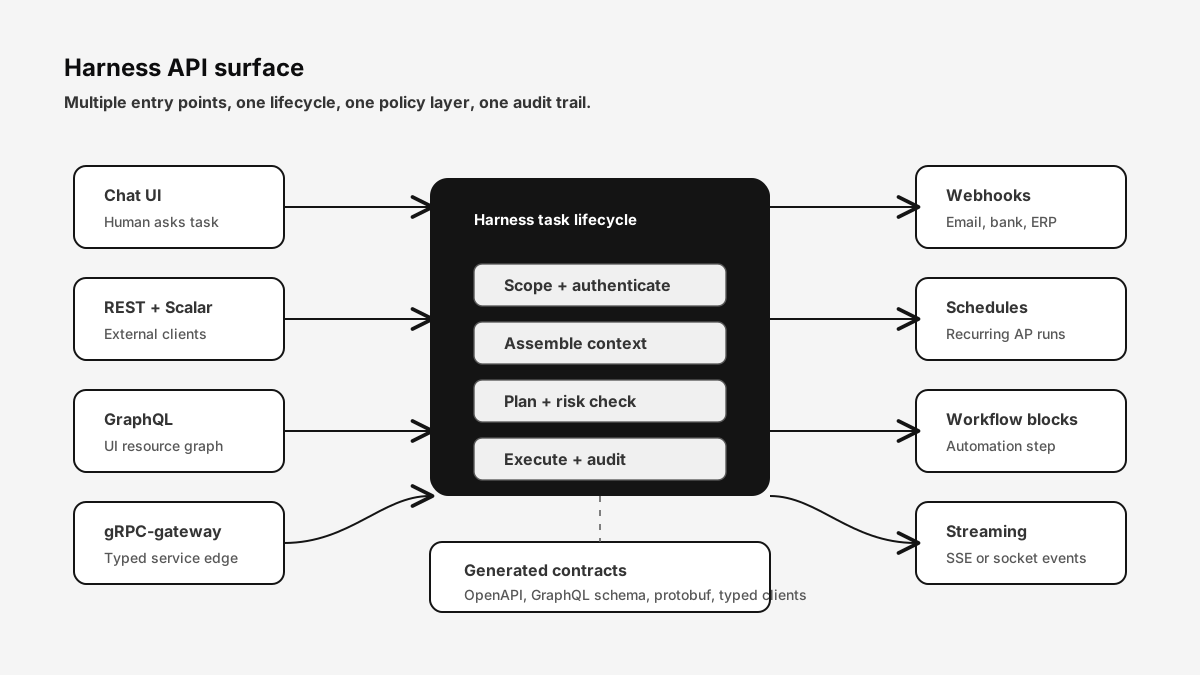 The same task lifecycle can be reached from chat, REST, GraphQL, gRPC-gateway, webhooks, schedules, and workflow blocks. A single policy and audit layer sits below all entry points.
The surface area should include:
| Surface | Use case |
|---|---|
| REST | Start tasks, inspect status, upload files, fetch logs, create approvals |
| Scalar/OpenAPI | Human-readable API docs and generated clients |
| GraphQL | UI-friendly querying of tasks, resources, evidence, and logs |
| gRPC-gateway | Internal typed service boundaries and future high-throughput clients |
| Protobuf | Generated contracts for tasks, events, tools, approvals, and resources |
| Webhooks | Inbound vendor emails, bank events, accounting sync callbacks |
| Server-sent events or WebSocket | Live task progress, tool call status, approval waits |
| Workflow blocks | Use Harness as one block inside a larger AP automation |
The API shape matters because Harness is not only a screen. It is the AP operating layer. Customers will eventually want to start a reconciliation task from their ERP, trigger categorization from a bank event, or retrieve evidence during close.
Streaming, logs, and observability
If an agent is acting for a finance team, "trust me" is not a logging strategy.
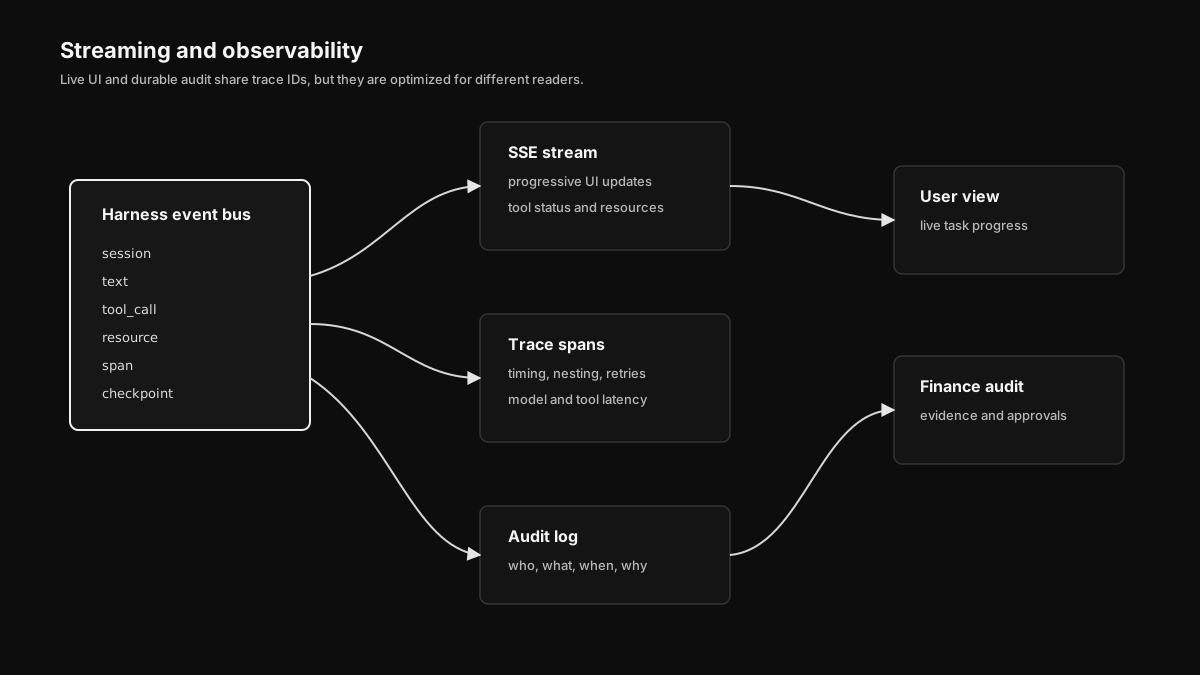 Harness emits typed stream events for text, tool calls, resources, spans, checkpoints, errors, and completion. The UI renders progress from the stream while logs persist the audit trail.
Harness streams typed events:
| Event | Purpose |
|---|---|
session | Chat/run metadata, title, trace id |
text | Assistant output and thinking summaries where allowed |
tool_call | Tool name, args, executor, phase, status |
resource | File, table, workflow, or knowledge object created or updated |
span | Timing and nested operation lifecycle |
checkpoint | Approval wait, pause, resume, compaction |
error | Classified failure with retry posture |
complete | Terminal status, usage, result summary |
The stream is for live UI. The log is for audit. They share trace IDs but serve different jobs.
For AP, the audit log has to answer questions months later:
- Who asked the agent to do this?
- Which records did it read?
- Which policy allowed or blocked each action?
- Which model and prompt context were used?
- Which tool calls produced side effects?
- Was the action idempotent?
- What evidence did the agent attach?
- Who approved the sensitive step?
That is why logs are not an afterthought. They are part of the product surface.
Failure boundaries
Agent failures are not all the same.
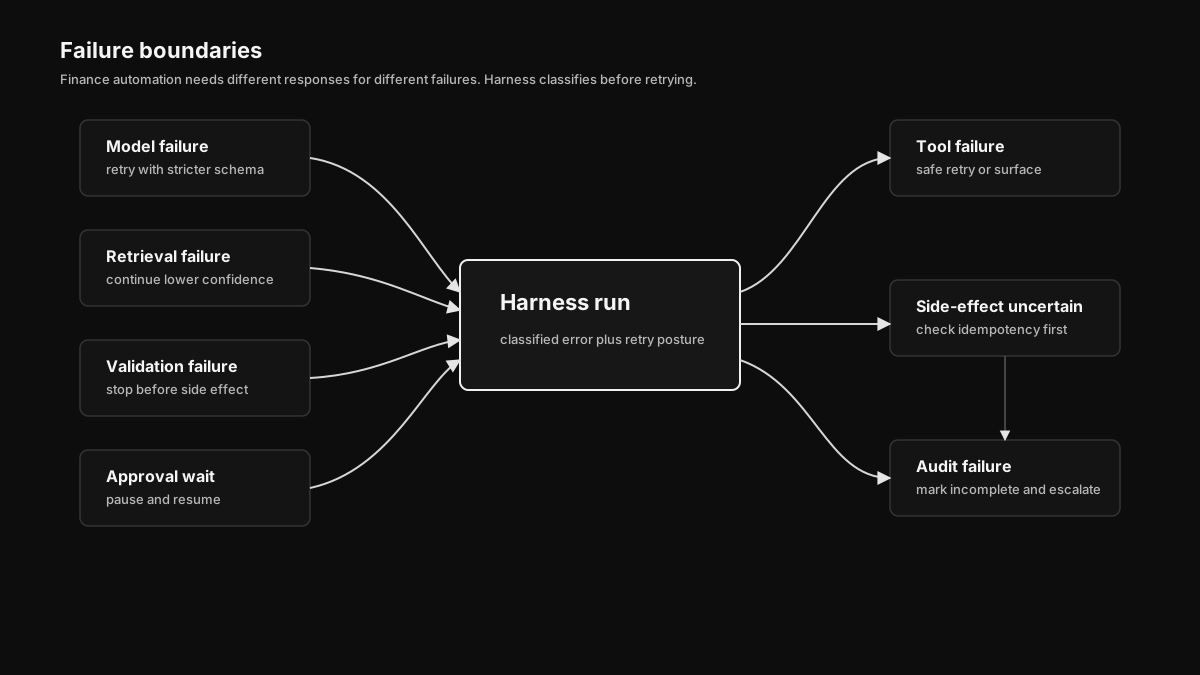 Harness separates model failures, retrieval failures, validation failures, approval waits, tool failures, external side-effect failures, and audit persistence failures. Each class has a different retry and escalation posture.
Harness classifies failures before deciding what to do next.
| Failure class | Example | Posture |
|---|---|---|
| Model failure | Invalid plan, malformed tool args, timeout | Retry with stricter schema or fall back to deterministic path |
| Retrieval failure | Knowledge connector down, file parser failed | Continue with lower confidence or ask for source material |
| Validation failure | Tool args fail schema, unknown category slug | Stop before side effect |
| Approval wait | Human approval required | Pause and resume later |
| Tool failure | Rate limit, OAuth expired, provider 500 | Retry if safe, otherwise surface |
| Side-effect uncertainty | Provider timeout after write request | Check idempotency key before retry |
| Audit failure | Result produced but evidence write failed | Mark incomplete and escalate |
This is where finance differs from ordinary productivity automation. If a Slack notification fails, you can retry. If a payment initiation times out after the provider received it, you cannot blindly retry. Harness keeps those cases separate.
Where model providers fit
Harness can call model providers for planning, extraction, summarization, code generation, and reasoning. But the model is not the system of record.
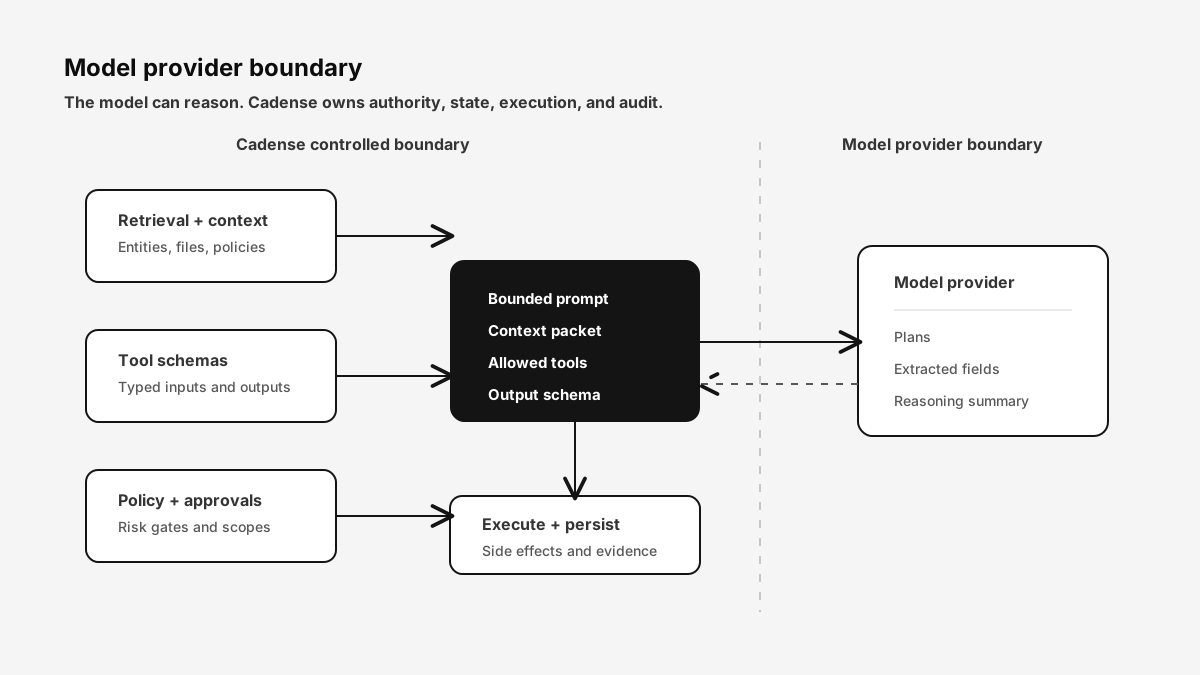 Model providers receive bounded context packets and return candidate reasoning or structured actions. Cadense owns retrieval, tool schemas, risk checks, approval gates, execution, and persistence.
The source of truth remains:
- Database rows for invoices, vendors, approvals, payments, bank transactions, categories, and reconciliation records.
- Files for source documents, generated artifacts, and evidence.
- Knowledge bases for policy and reference material.
- Tool logs for side effects.
- Approval records for sensitive actions.
The model produces candidate reasoning and candidate actions. Cadense validates, gates, executes, and records them.
This distinction matters because model quality will keep changing. A workspace control plane should get better when models improve, but it should not become unsafe when a model changes its style.
Tables
Tables give Harness a structured working memory. They are useful for simple CRM-style examples, but in AP they become more concrete:
- Imported vendor lists before merge into the vendor master.
- Invoice intake staging rows.
- Exception queues with owner, priority, and due date.
- Reconciliation rule drafts.
- Month-end close checklists.
- Scheduled task run summaries.
Harness can create tables, infer schemas from CSVs, seed rows, query records, and use table state across runs. A scheduled task can remember which vendors it already chased. A reconciliation assistant can keep a queue of ambiguous matches. A controller can review table rows before they become accounting writes.
Tables are memory with columns, not vibes.
Files
Files are where AP evidence lives.
Invoices, W-9s, vendor contracts, bank statements, remittance files, payment confirmations, exception reports, and month-end exports all need to be stored, previewed, parsed, and referenced later.
Harness can read and write files programmatically. It can turn a PDF into extracted fields, create a Markdown exception report, import CSV rows into a table, attach evidence to a reconciliation match, or generate a close packet for review.
The important thing is that file outputs are artifacts. The user can inspect them. A later audit can find them. Another workflow can use them.
Knowledge bases
Knowledge bases ground the agent in the way a company actually works.
For AP, this usually means:
- Approval policies.
- Vendor onboarding rules.
- Payment method rules.
- GL coding playbooks.
- Entity-specific accounting notes.
- Contract terms.
- Close calendars.
- Escalation procedures.
Harness uses knowledge retrieval as evidence, not as loose inspiration. Retrieved chunks carry source IDs and citations. If the policy says invoices over $25,000 require controller approval, the agent should be able to point to the policy chunk that said so.
What we will not automate blindly
Harness is designed to do work, but some work should stay gated:
- Initiating or approving payments.
- Changing vendor bank details.
- Posting final journal entries.
- Overriding reconciliations above a confidence or amount threshold.
- Changing approval policies.
- Modifying workspace credentials.
- Sending external emails that represent a finance decision.
These actions can still be part of an agent workflow. The difference is that Harness pauses, shows the proposed action, attaches evidence, and waits for the right approval.
That is the line we care about: agents should reduce busywork, not erase controls.
It all connects
Harness queries Tables, searches Knowledge Bases, reads and writes Files, calls integrations, executes workflows, responds to inbox tasks, and runs schedules. But the connective tissue is the task lifecycle: scope, context, plan, risk, execute, evidence, audit.
That lifecycle is what lets an agent operate AP work on behalf of a customer without becoming a black box.
The first version of Harness makes the workspace usable by agents. The next versions will make the agent more specialized for finance operations: deeper AP schemas, richer reconciliation and categorization hooks, accounting integration review flows, dual-control payment gates, and better evaluation datasets for agent behavior.
The point is not to make a smarter chat window. The point is to give finance teams an operator that can do real work inside real boundaries.
Get started
Cadense Harness is available at cadense.io. The docs live at docs.cadense.io.
Questions? [email protected]
FAQ
What is Harness in Cadense?
Harness is the control plane that lets AP agents use workspace context, tables, files, knowledge bases, integrations, scheduled tasks, and audited tool execution from one governed surface.
Can Harness act on behalf of a customer?
Yes, but only inside the workspace permissions, approval policies, credential scopes, and action risk rules configured for that customer. Read operations, low-risk writes, and high-risk finance actions follow different gates.
Does Harness call an LLM provider?
Harness can use configured model providers for planning, extraction, summarization, and reasoning. The LLM does not become the source of truth. Cadense records inputs, retrieved context, tool calls, approvals, outputs, and evidence separately.
How does Harness avoid silent finance mistakes?
Harness separates planning from execution, validates tool arguments, classifies action risk, requires approval for sensitive writes, uses idempotency keys for external actions, and writes an audit trail for every run.
How is Harness different from a chatbot?
A chatbot answers from conversation context. Harness has durable resources, scoped credentials, tool execution, schedules, inbox tasks, streaming events, and persistent records, so it can operate AP workflows over time.