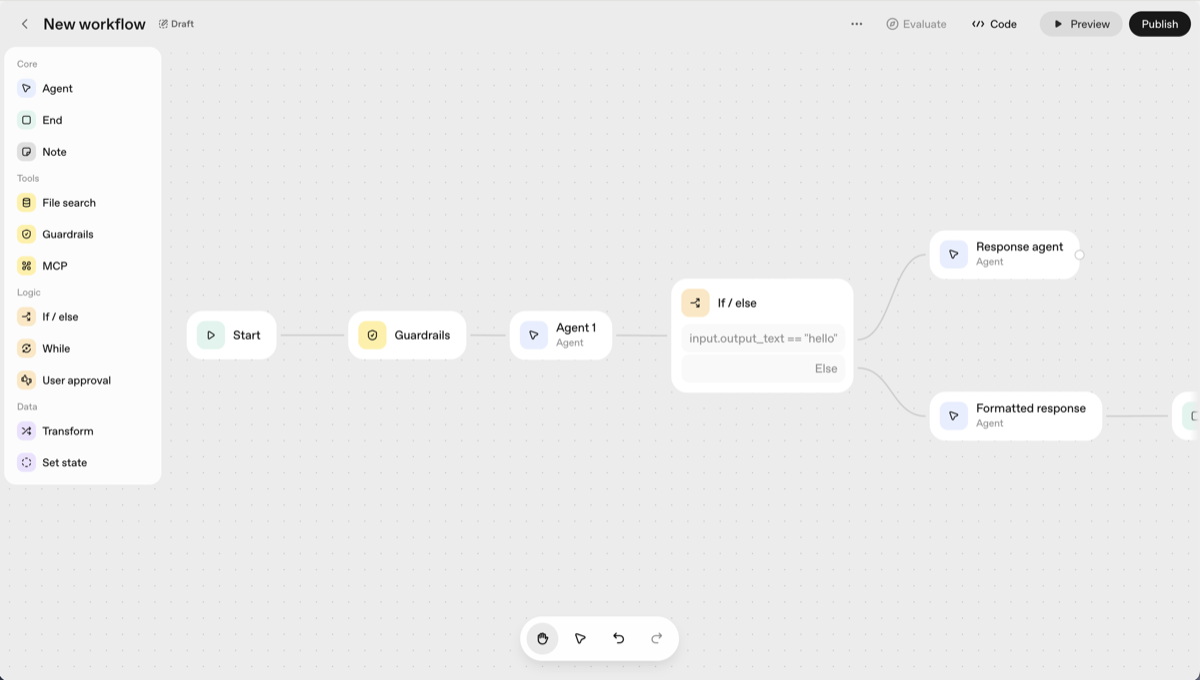
When building AI agent workflows, teams often evaluate multiple platforms to find the right fit for their needs. Three platforms frequently come up in these discussions: OpenAI's AgentKit, the established workflow automation tool n8n, and Cadense, an AP-focused agent workflow builder. While all three enable AI agent development, they take fundamentally different approaches, each with distinct strengths and ideal use cases.
What is OpenAI AgentKit?
OpenAI AgentKit is a set of building blocks designed to help developers take AI agents from prototype to production. Built on top of the OpenAI Responses API, it provides a structured approach to building and deploying intelligent agents.
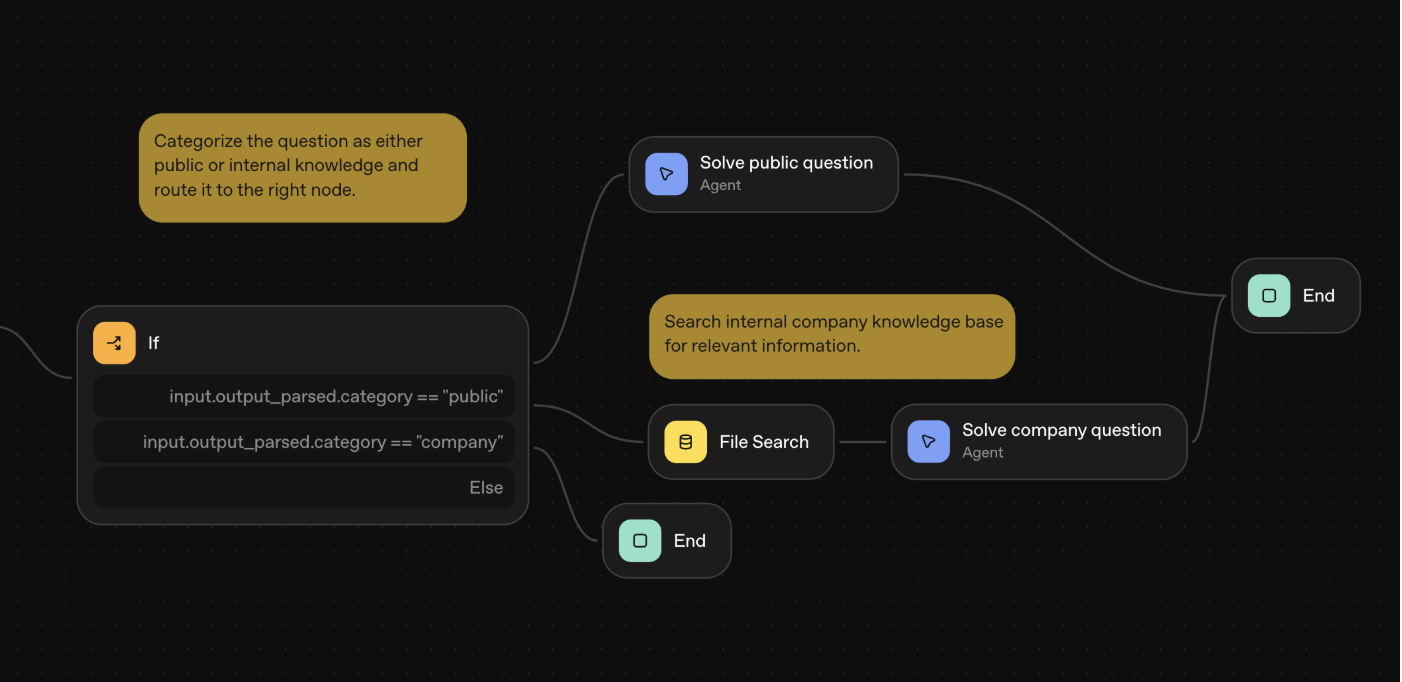
Core Features
Agent Builder Canvas
AgentKit provides a visual canvas where developers can design and build agents. This interface allows you to model complex workflows visually, making it easier to understand and iterate on agent behavior. The builder is powered by OpenAI's Responses API.
ChatKit for Embedded Interfaces
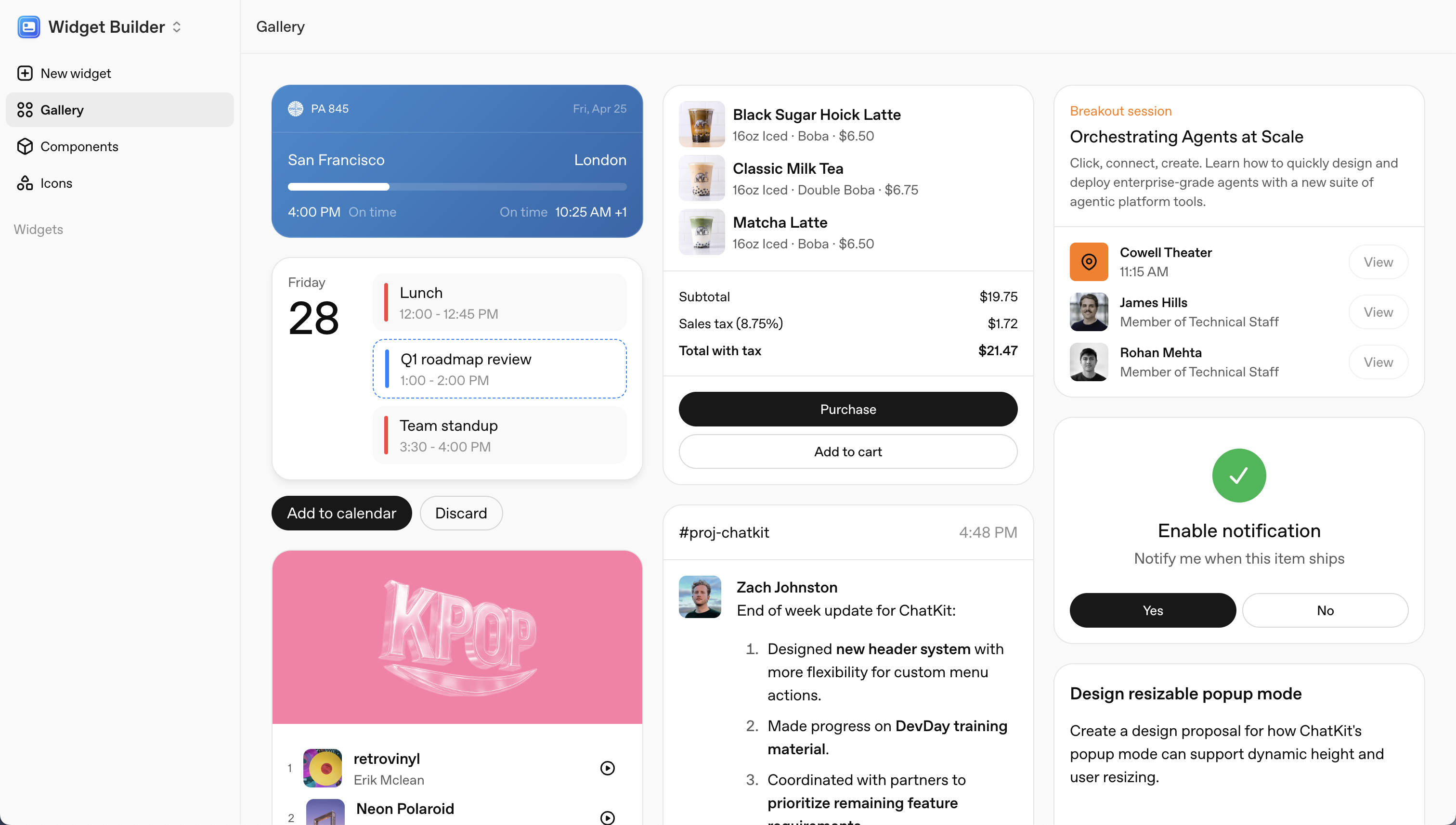
ChatKit enables developers to embed chat interfaces to run workflows directly within their applications. It includes custom widgets that you can create and integrate, with the ability to preview interfaces right in the workflow builder before deployment.
Comprehensive Evaluation System
AgentKit includes out-of-the-box evaluation capabilities to measure agent performance. Features include datasets to assess agent nodes, prompt optimization tools, and the ability to run evaluations on external models beyond OpenAI's ecosystem.
Connectors and Integrations
The platform provides connectors to integrate with both internal tools and external services, enabling agents to interact with your existing tech stack.
API Publishing
Once your agent is ready, the publish feature allows you to integrate it as an API inside your codebase, making deployment straightforward.
Built-in Guardrails
AgentKit comes with guardrails out of the box, helping ensure agent behavior stays within defined boundaries and safety parameters.
What AgentKit Doesn't Offer
While AgentKit is powerful for building agents, it has some limitations:
- Only able to run OpenAI models—no support for other AI providers
- Cannot make generic API requests in workflows—limited to MCP (Model Context Protocol) integrations only
- Not an open-source platform
- No workflow templates to accelerate development
- No execution logs or detailed monitoring for debugging and observability
- No ability to trigger workflows via external integrations
- Limited out-of-the-box integration options compared to dedicated workflow automation platforms
What is n8n?
n8n is a workflow automation platform that excels at connecting various services and APIs together. While it started as a general automation tool, n8n has evolved to support AI agent workflows alongside its traditional integration capabilities.
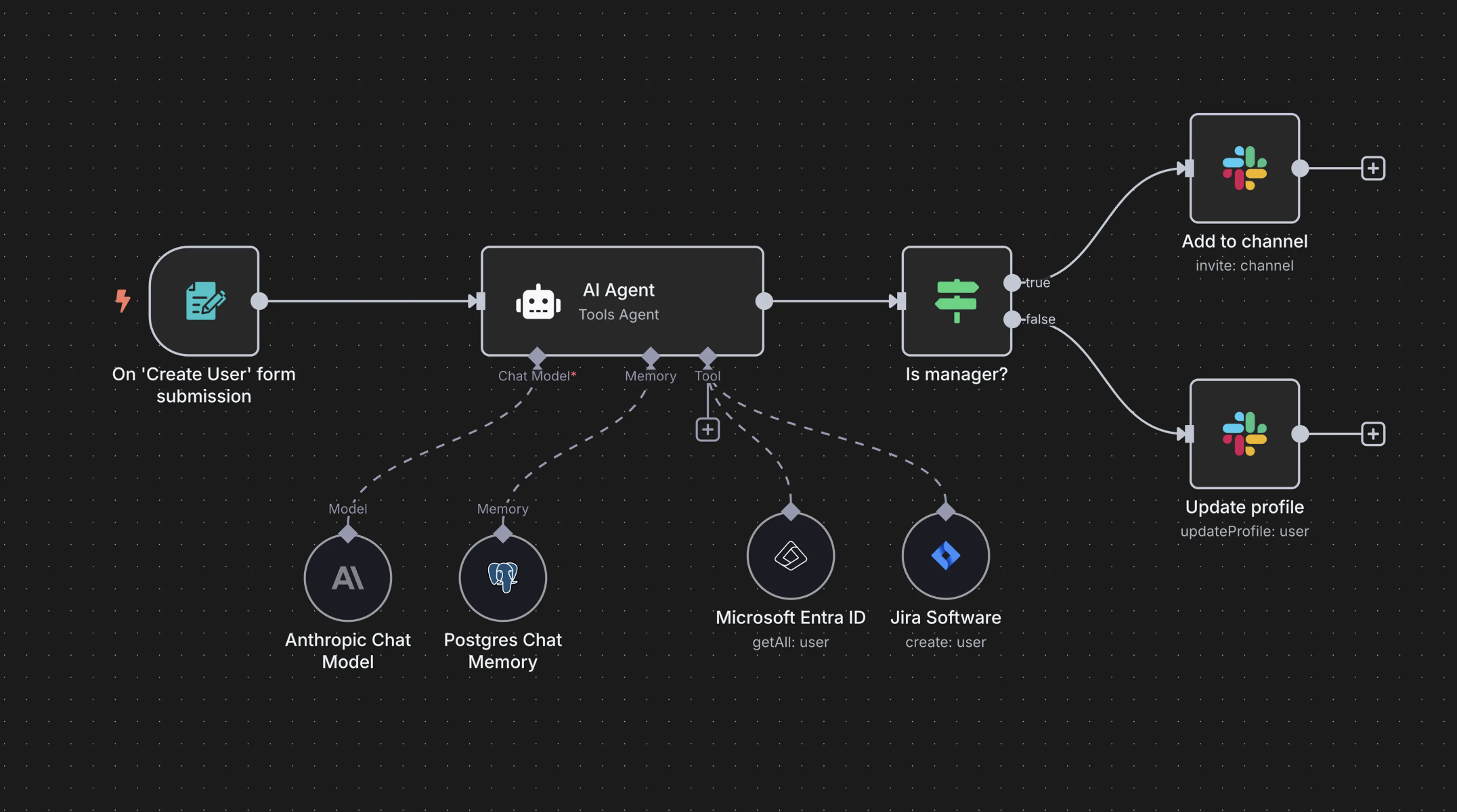
Core Capabilities
Extensive Integration Library
n8n's primary strength lies in its vast library of pre-built integrations. With hundreds of connectors for popular services, it makes it easy to connect disparate systems without writing custom code.
Visual Workflow Builder
The platform provides a node-based visual interface for building workflows. Users can drag and drop nodes representing different services and configure how data flows between them.
Flexible Triggering Options
n8n supports various ways to trigger workflows, including webhooks, scheduled executions, and manual triggers, making it versatile for different automation scenarios.
AI and LLM Integration
More recently, n8n has added support for AI models and agent-like capabilities, allowing users to incorporate language models into their automation workflows.
Self-Hosting Options
n8n offers both cloud-hosted and self-hosted deployment options, giving organizations control over their data and infrastructure.
Primary Use Cases
n8n is best suited for:
- Traditional workflow automation and service integration
- Data synchronization between business tools
- Event-driven automation workflows
- Simple AI-enhanced automations
What n8n Doesn't Offer
While n8n is excellent for traditional automation, it has some limitations for AI agent development:
- No SDK to build workflows programmatically—limited to visual builder only
- Not fully open source but fair-use licensed, with some restrictions
- Free trial limited to 14 days, after which paid plans are required
- Limited/complex parallel execution handling
What is Cadense?
Cadense is a fully open-source platform (Apache 2.0 license) specifically designed for AI agent development. Unlike platforms that added AI capabilities as an afterthought, Cadense was created from the ground up to address the unique challenges of building, testing, and deploying production-ready AI agents.
Comprehensive AI Agent Platform
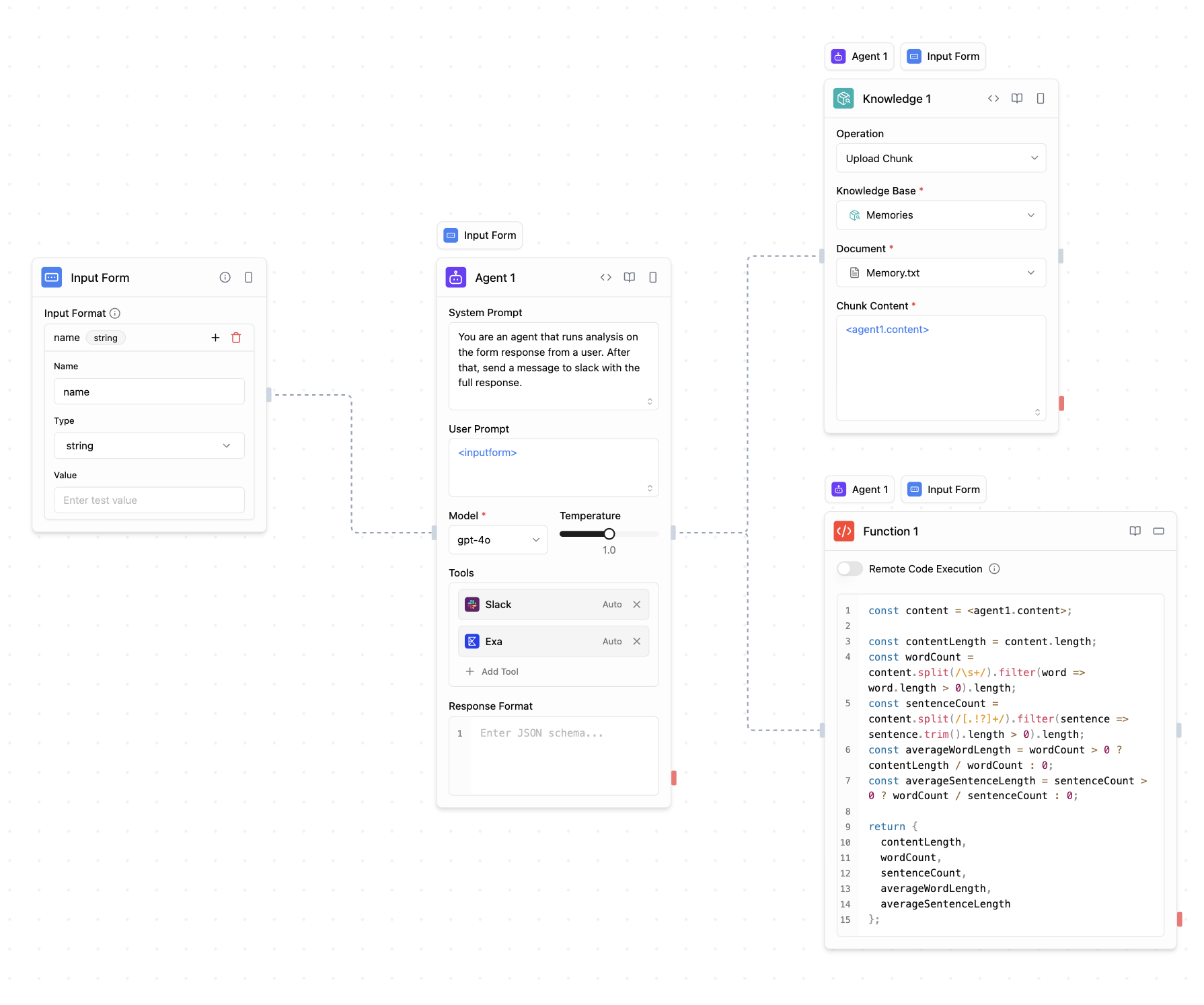
Visual AI Workflow Builder
Cadense provides an intuitive drag-and-drop canvas where finance and engineering teams can build complex AP agent workflows visually. The platform supports sophisticated agent architectures, including multi-agent systems, conditional logic, loops, and parallel execution paths. Additionally, Cadense Copilot can assist you directly in the editor, helping you build and modify workflows faster with intelligent suggestions and explanations.
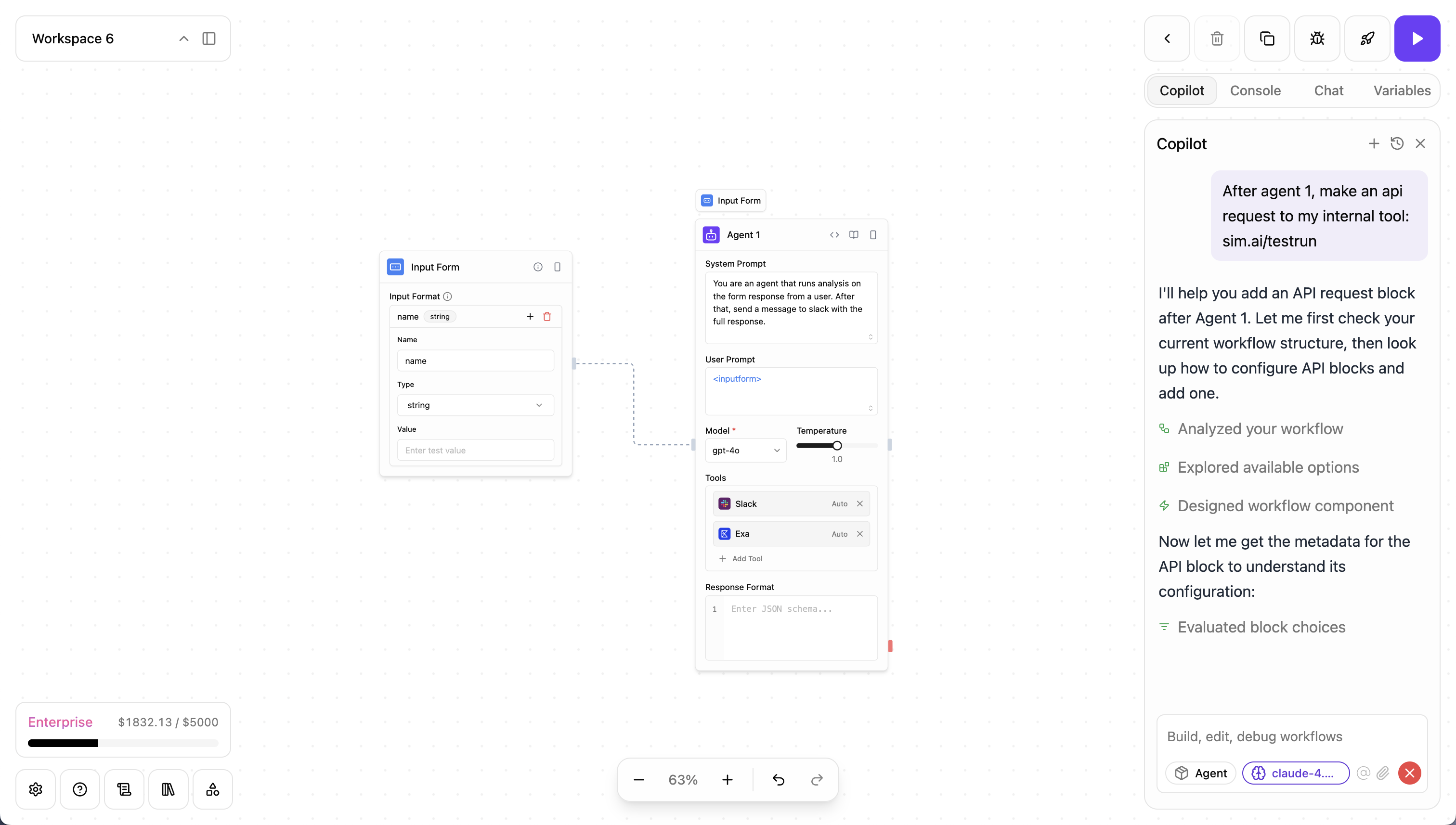
AI Copilot for Workflow Building
Cadense includes an intelligent in-editor AI assistant that helps you build and edit workflows faster. Copilot can explain complex concepts, suggest best practices, and even make changes to your workflow when you approve them. Using the @ context menu, you can reference workflows, blocks, knowledge bases, documentation, templates, and execution logs—giving Copilot the full context it needs to provide accurate, relevant assistance. This dramatically accelerates workflow development compared to building from scratch.
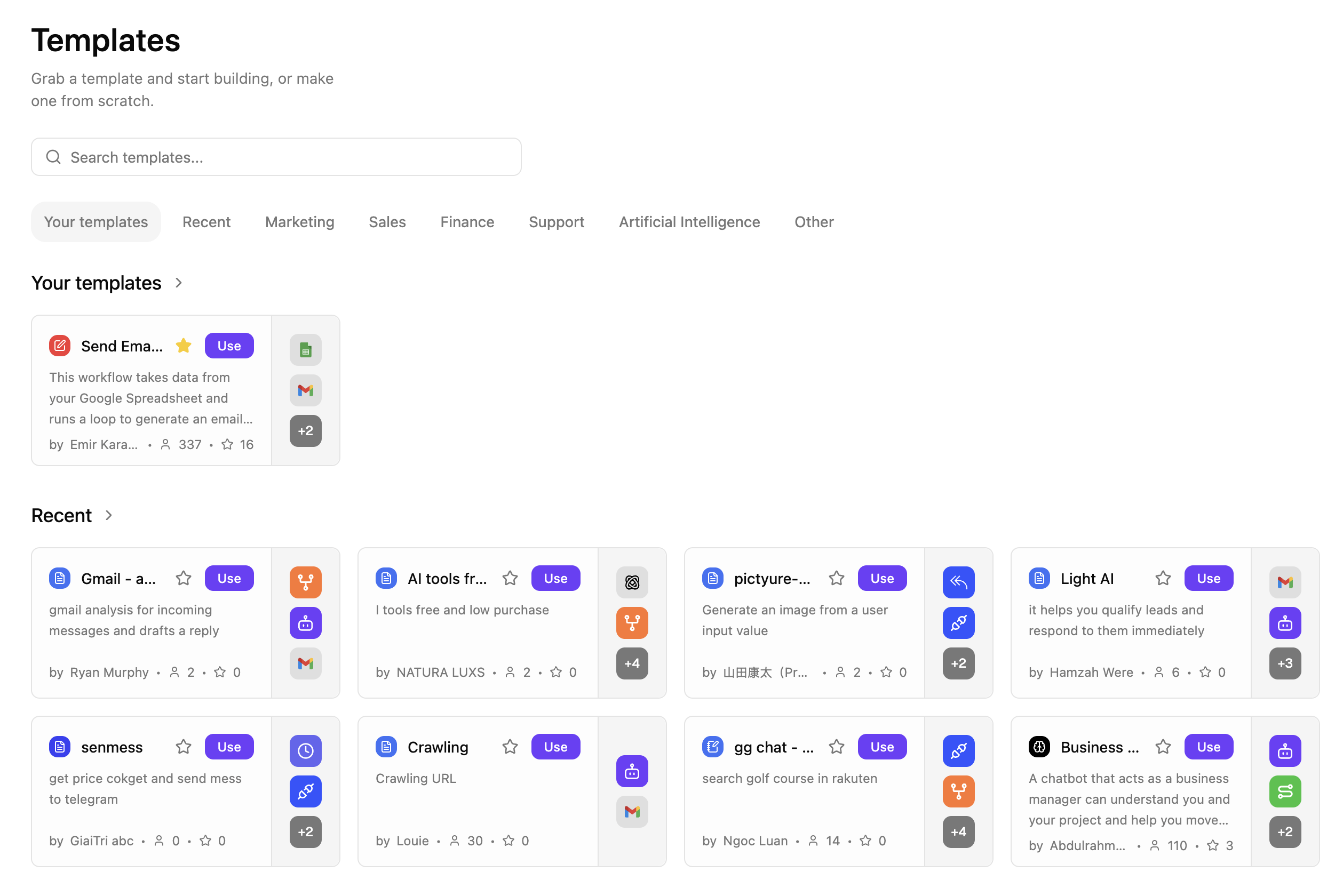
Pre-Built Workflow Templates
Get started quickly with Cadense's extensive library of pre-built workflow templates. Browse templates across categories like Marketing, Sales, Finance, Support, and Artificial Intelligence. Each template is a production-ready workflow you can customize for your needs, saving hours of development time. Templates are created by the Cadense team and community members, with popularity ratings and integration counts to help you find the right starting point.
80+ Built-in Integrations
Out of the box, Cadense connects with 80+ services including multiple AI providers (OpenAI, Anthropic, Google, Groq, Cerebras, local Ollama models), communication tools (Gmail, Slack, Teams, Telegram, WhatsApp), productivity apps (Notion, Google Sheets, Airtable, Monday.com), and developer tools (GitHub, GitLab).
Multiple Trigger Options
Unlike AgentKit, Cadense workflows can be triggered in multiple ways: chat interfaces, REST APIs, webhooks, scheduled jobs, or external events from integrated services like Slack and GitHub. This flexibility ensures your agents can be activated however your use case demands.
Real-Time Team Collaboration
Cadense enables multiple team members to work simultaneously on the same workflow with real-time editing, commenting, and comprehensive permissions management. This makes it ideal for teams building complex agent systems together.
Advanced Agent Capabilities
The platform includes specialized blocks for AI agents, RAG (Retrieval-Augmented Generation) systems, function calling, code execution, data processing, and evaluation. These purpose-built components enable developers to create sophisticated agentic workflows without custom coding.
Intelligent Knowledge Base with Vector Search
Cadense's native knowledge base goes far beyond simple document storage. Powered by pgvector, it provides semantic search that understands meaning and context, not just keywords. Upload invoices, W-9s, policies, statements, and supporting documents in multiple formats (PDF, Word, Excel, Markdown, and more), and Cadense automatically processes them with intelligent chunking, generates vector embeddings, and makes them instantly searchable. The knowledge base supports natural language queries, concept-based retrieval, multi-language understanding, and configurable chunk sizes (100-4,000 characters). This makes building RAG agents straightforward—your AI can search through your organization's AP knowledge with context-aware precision.
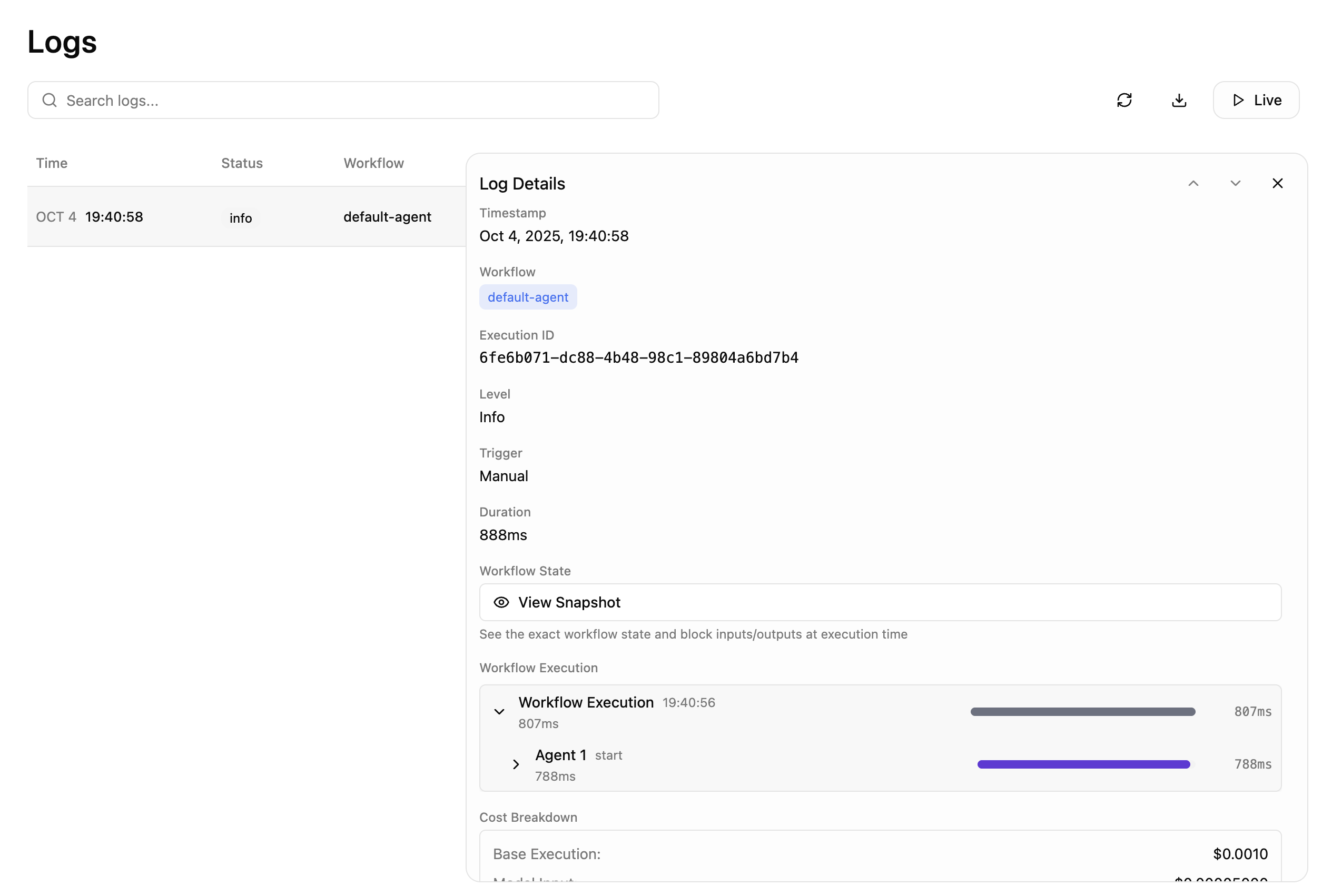
Comprehensive Execution Logging and Monitoring
Cadense provides enterprise-grade logging that captures every detail of workflow execution. Track workflow runs with execution IDs, view block-level logs with precise timing and duration metrics, monitor token usage and costs per execution, and debug failures with detailed error traces and trace spans. The logging system integrates with Copilot—you can reference execution logs directly in your Copilot conversations to understand what happened and troubleshoot issues. This level of observability is essential for production AI agents where understanding behavior and debugging issues quickly is critical.
Custom Integrations via MCP Protocol
Beyond the 80+ built-in integrations, Cadense supports the Model Context Protocol (MCP), allowing developers to create custom integrations for proprietary systems or specialized tools.
Flexible Deployment Options
Cadense offers both cloud-hosted and self-hosted deployment options. Organizations can run Cadense on their own infrastructure for direct control over deployment and data handling, or use the managed cloud service for simplicity.
Production-Ready Infrastructure
The platform includes everything needed for production deployments: background job processing, webhook handling, monitoring, and API management. Workflows can be published as REST API endpoints, embedded via SDKs, or run through chat interfaces.
What You Can Build with Cadense
- AI Assistants & Chatbots: Intelligent agents that search the web, access calendars, send emails, and interact with business tools
- Business Process Automation: Automate repetitive tasks like data entry, report generation, customer support, and content creation
- Data Processing & Analysis: Extract insights from documents, analyze datasets, generate reports, and sync data between systems
- API Integration Workflows: Connect multiple services into unified endpoints and orchestrate complex business logic
- RAG Systems: Build sophisticated retrieval-augmented generation pipelines with custom knowledge bases
Drawbacks to Consider
While Cadense excels at AI agent workflows, there are some tradeoffs:
- Fewer pre-built integrations compared to n8n's extensive library—though Cadense's integrations cover common AP agent use cases and MCP protocol enables custom integrations
Key Differences
While all three platforms enable AI agent development, they excel in different areas:
OpenAI AgentKit
Best for: Teams deeply invested in the OpenAI ecosystem who prioritize evaluation and testing capabilities. Ideal when you need tight integration with OpenAI's latest models and want built-in prompt optimization and evaluation tools.
Limitations: Locked into OpenAI models only, not open-source, no workflow templates or execution logs, limited triggering options, and fewer out-of-the-box integrations.
n8n
Best for: Traditional workflow automation with some AI enhancement. Excellent when your primary need is connecting business tools and services, with AI as a complementary feature rather than the core focus.
Limitations: No SDK for programmatic workflow building, fair-use licensing (not fully open source), 14-day trial limitation, and AI agent capabilities are newer and less mature compared to its traditional automation features.
Cadense
Best for: Building production-ready AI agent workflows that require flexibility, collaboration, and comprehensive tooling. Ideal for teams that need AI Copilot assistance, advanced knowledge base features, detailed logging, and the ability to work across multiple AI providers with purpose-built agentic workflow tools.
Limitations: Fewer integrations than n8n's extensive library, though the 80+ built-in integrations and MCP protocol support cover most AI agent needs.
Which Should You Choose?
The right platform depends on your specific needs and context:
Choose OpenAI AgentKit if you're exclusively using OpenAI models and want to build chat interfaces with the ChatKit. It's a solid choice for teams that want to stay within OpenAI's ecosystem and prioritize testing capabilities.
Choose n8n if your primary use case is traditional workflow automation between business tools, with occasional AI enhancement. It's ideal for organizations already familiar with n8n who want to add some AI capabilities to existing automations.
Choose Cadense if you're building AP agents as your primary objective and need a platform purpose-built for invoice intake, reconciliation, categorization, approvals, and controlled finance operations. Cadense provides the most comprehensive feature set for agentic AP workflows, with Copilot to accelerate development, parallel execution handling, intelligent knowledge base for RAG applications, detailed execution logging for production monitoring, flexibility across AI providers, integrations, team collaboration, and deployment options that scale from prototype to production.